
Portal as an application directory#
Portal provides a shared entry point for enrolled business applications. It is itself a Matrix application with separate Contracts, API, Web, AppHost and ServiceDefaults projects. It consumes a coherent set of Matrix packages; its role is to compose shared capabilities and present an authorized application directory.
The directory describes whole applications. Application-specific routes, business permissions and data remain with their owners. A visible card is a navigation result, not a transferable authorization grant. Opening that card takes the browser to the destination application, which authenticates and authorizes the request independently.
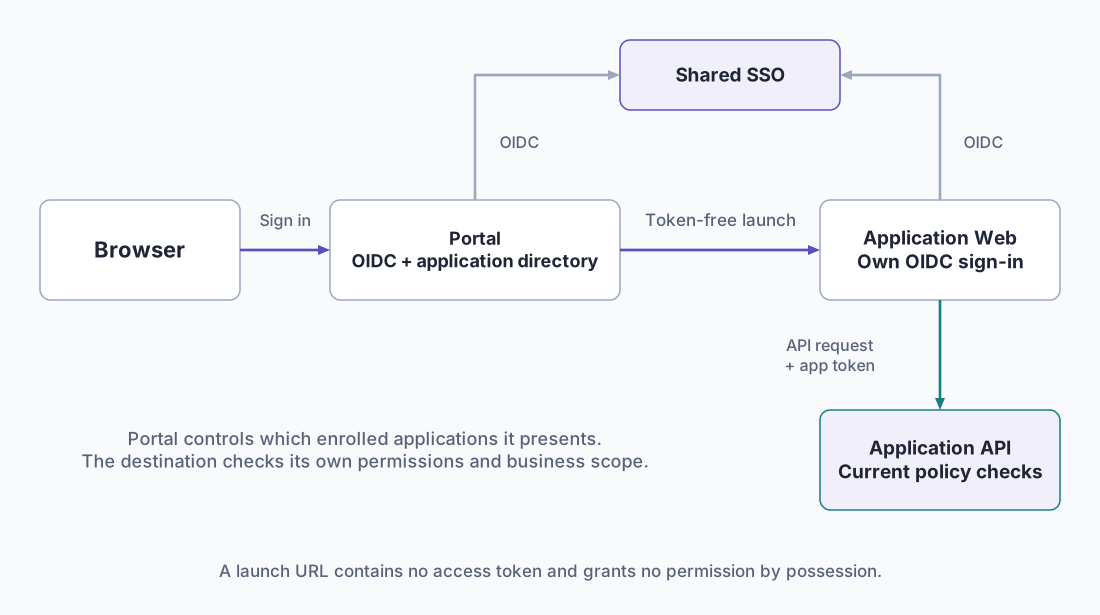
Where directory information lives#
In the documented Keycloak integration, primary Web clients hold reviewed application metadata such as launch origin, display name, icon key, ownership and environment. API clients hold application roles. The controlled registration process reconciles these objects and the narrow claims Portal needs to determine launch eligibility.
| Responsibility | Owner |
|---|---|
| Web origin, application identity and role contract | Application owner, through reviewed registration |
| Approved launch scope and identity policy | Infrastructure and identity owners |
| Directory read and card projection | Portal API |
| Search, cards and navigation | Portal Web |
| Business-operation authorization | Destination application |
Portal uses a separate confidential directory reader. This credential belongs to its API, not its Web host or another consumer. The API validates the issuer and its own audience, enforces Portal entry and directory permissions, and returns bounded card data. Client secrets, raw client records and identity-administration details must not reach the browser.
The documented reader policy has realm-wide metadata visibility. Narrower visibility is a separate identity-policy integration that needs compatibility testing. A Portal administrator role does not grant identity-provider administration rights.
Enroll an application#
- Select the supported application package and toolkit baseline. Record the deployment identity, environment, Web origin and separate Web/API client identities.
- Register exact sign-in, logout and backchannel callbacks through the controlled identity workflow. Supply credentials through the installation's secret mechanism.
- Declare the application metadata and approved launch origin. Use trusted icon keys; arbitrary image URLs and executable metadata are not directory content.
- Have the identity owner map the application's effective entry permission into Portal's dedicated launch scope. Do not copy all business roles or broaden API audiences.
- Verify both direct entry and launch from Portal with permitted and denied users. The target must deny unauthorized business operations even when its URL is known.
- Enable the directory entry only after the application's authentication, authorization and canonical HTTPS route have been accepted.
The enrollment worksheet is a handoff aid, not an automatically bound runtime schema. An application must deliberately map supplied values into its own host configuration. Configure trusted destinations on the server rather than deriving them from request headers, browser input or a return URL.
Caching and failure behavior#
Portal caches metadata for a bounded interval and intersects it with the current authenticated principal on each request. Missing or malformed access claims grant nothing. The documented baseline uses a 60-second metadata cache and a periodic browser refresh; an outage does not extend expired metadata. Failure should present a retry state rather than another user's cached directory.
Issued tokens retain their claims until their normal expiry or supported refresh/session handling takes effect. Removing a role therefore does not instantaneously rewrite an existing token. Account for this when designing revocation and operational acceptance.
Portal preferences and the common inbox are separately enrolled services. Adding a directory card does not enroll either integration. Subscription billing, subscription expiry and project-card favorites remain future requirements in the product definition. Confirm current capabilities against the selected release rather than inferring them from reserved UI space.
Continue with identity and sessions or shared preferences.